


In the fast-paced world of academic research, time is a precious commodity for scientists. Yet, a significant portion of their time often gets consumed by technical tasks, especially managing bibliographies. Reference managers, also known as bibliographic managers, emerge as essential tools that not only save researchers time but also alleviate the stress associated with handling references and citations.
Why are reference managers needed?
Reference managers serve as specialized software designed to perform various crucial functions, including:
- Formation of a personal or integrated bibliography for research purposes.
- Organization of scientific sources, facilitating systematization and commenting.
- Integration with popular word processors for the automatic generation of bibliographies and references.
- Preparation of manuscripts adhering to the requirements of diverse academic styles.
As one scientist aptly puts it, working with reference managers revolutionizes the process of writing academic texts, eliminating the complexities of manual citation formatting and allowing researchers to focus on their creative work.
Why Zotero?
While a plethora of reference managers exists, Zotero stands out for several reasons:
-
Ease of Use: Among the various reference managers, Zotero is recognized for its user-friendly interface and minimal learning curve.
-
Cost: Zotero is a free reference manager, making it accessible to a broad audience without compromising on functionality.
-
Cross-Platform Compatibility: Available on Windows, MacOS, and Linux, Zotero ensures a consistent user experience across different operating systems.
-
Multilingual Interface: Zotero uniquely offers a Ukrainian and Russian interface, catering to users with language preferences beyond English.
In addition to these advantages, Zotero integrates seamlessly with valuable resources like Scite, enhancing its utility for article verification using citations.
Zotero Features:
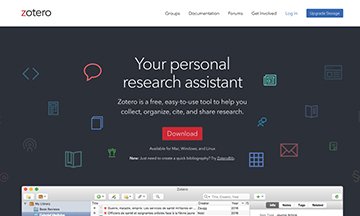
Zotero, available as both a browser plug-in and a standalone application, offers a simple yet powerful interface. Key features include:
-
Library Organization: Users can create collections and sub-collections to organize their library efficiently.
-
Keyword Panel: Zotero includes a keyword panel to link keywords to references, aiding in effective categorization.
-
Customizable Interface: The main area displays a list of references, with customizable columns for information such as document type, date added, publisher, and more.
-
Information Panel: The right panel provides detailed information about the selected reference, allowing users to input and access a variety of data fields.
Zotero's adaptability is further enhanced by its support for modifications, with specialized modules catering to specific scenarios, such as the Juris-M modification for legal texts.
As scientists continue to grapple with time constraints, Zotero emerges as a valuable ally, simplifying the management of references and contributing to a more efficient and focused research process.